Open Flow

The Flow list — newest pipeline at the top, one row per run, dots for stages.
N pipelines · N lanes · N passed.
Each row shows:
- Goal — the sentence you entered when you started the pipeline.
- Pipeline id + relative age — e.g.
4fe7b828… · 6h ago. - Agent kind — e.g.
dev(the coding agent that drove the line). - Stage timeline — dots left to right, spanning the full row width. First dot flush left, last flush right, connector line between them.
Filter tabs
Above the list:
Each tab shows its count in parentheses. The search box on the right
filters the current tab by goal text or by pipeline id.
Stage dots — what the colors mean
Dots are ordered by workflow execution order (whichever stage the workflow
ran first shows first) — not by dispatch time or the order you dragged bees
into the composer. Rework rounds (
dev · fix #2, qe · re-review #2, …)
land in their append-time position after their predecessor.
Open the drawer
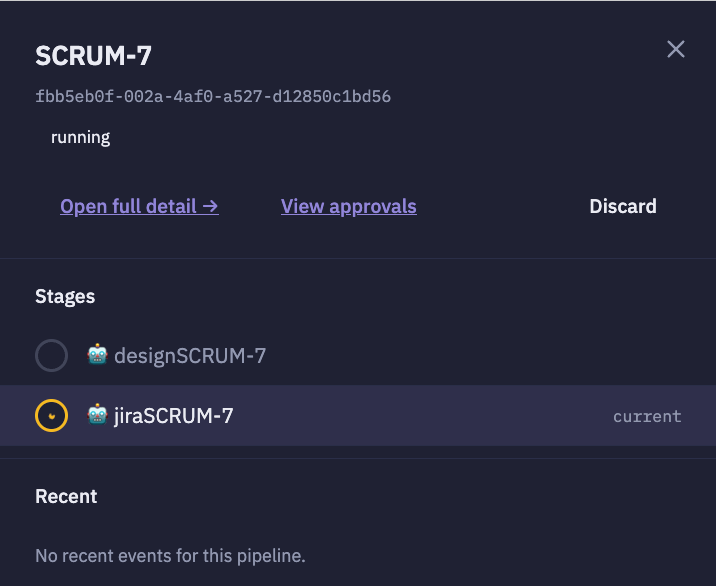
The right-side drawer — status badge, quick actions, stages list, recent events.
- Header — goal, pipeline id, and the pipeline’s current status (
running,completed,failed,changes_requested,discarded). - Quick actions — Open full detail →, View approvals, Discard.
- Stages — one row per stage in execution order; the current stage is
highlighted with a
currentbadge. - Recent — the last few pipeline events (gate approvals, verdicts, task transitions).
Click a stage → jump to detail
Every stage row in the drawer is a link. Where it takes you depends on whether the pipeline is still live:Discard a pipeline
From the drawer, click Discard. The pipeline is marked terminal and no further stages fire; the row drops off the list on the next refresh. The underlying task rows are kept for audit (they no longer count against your workspace slot or plan quota).Retry a crashed lane
On a Failed pipeline, the row’s action button reads ↻ Retry crashed. Retrying re-dispatches the failing stage on the same branch. The rework loop respects the pipeline’s max-round cap (default 3) — after that it stops and the pipeline is finalized aschanges_requested.
Related
- Pipelines — how to compose an assembly line of bees.
- Coordination — multi-agent hive coordination.
- Guided vs Developer view — the two views on the individual task screen.